
Conventional technical support is no longer enough. In the age of artificial intelligence, it is important not only to know how to solve problems, but also to spot threats before they affect your website.
Many website owners (who, unfortunately, are not the brightest) only think about security when something happens. The website stops loading, leads disappear, the admin panel is locked, or the hosting provider sends a suspicious activity alert. Until then, it seems that everything is working, so everything must be fine.
But a functioning website and a secure website are two completely different things.
What is a php2shell attack?
php2shell (CVE-2024-4577) is a critical CGI vulnerability in PHP. It allows attackers to bypass restrictions (particularly those related to character encoding when processing command-line arguments) and execute arbitrary code on the server (Remote Code Execution / RCE). The discovered vulnerabilities received a score of 9.2 out of 10 on the CVSS 4.0 scale, corresponding to a critical severity rating.Under certain conditions, they may allow attackers to execute commands on the server without prior authorization.
Put simply, this vulnerability allows a hacker to include special characters in a URL request, trick PHP into executing third-party code, and upload a malicious web shell (php-shell) to your server, gaining full control over the website or server.
The story of the PHP2Shell vulnerabilities once again reminded me how important it is to monitor the security not only of the website itself, but also of the entire infrastructure it runs on. And the rapid development of artificial intelligence makes this issue even more pressing.
Across Europe, government websites and online resources belonging to hospitals and other organizations were temporarily taken offline due to critical vulnerabilities in PHP, one of the most widely used programming languages for websites. Those that did so included government agencies in the Netherlands, Denmark, and Finland, Edinburgh City Council, the British Broadcasting Corporation (BBC), and the Russian TV channel Dozhd. PHP developers have already released fixes, but website owners need to install the updates as soon as possible and check the security of their servers.
Related: Critical PHP Vulnerabilities: What Website Owners Need to Do to Reduce the Risk of Being Hacked
Artificial intelligence is changing the rules of the game
Just a few years ago, exploiting vulnerabilities depended largely on the skills and time of a particular individual. An attacker had to understand how the system worked, find a suitable vulnerability, prepare the tools, and attempt to exploit it against a specific website. Such attacks could also be automated and carried out at scale, but finding, configuring, and running many attack scenarios required knowledge and effort.
Today, the situation is changing.
Artificial intelligence is making it possible to automate more and more stages of vulnerability exploitation. AI agents can perform sequences of technical tasks, and some tools can be configured with minimal human involvement. Open-source models and tools are becoming available that technically skilled users can run independently, including on their own hardware.
If a vulnerability is known, a ready-made exploit is available, and a list of potential targets has already been compiled, automation can significantly simplify the execution of attacks. A person does not necessarily have to check every website and perform every action manually. They can set up a process in which tools automatically scan numerous targets and attempt to exploit any weaknesses they find.
Consider the following scenario: information emerges about a critical vulnerability in popular software. A ready-made scanning tool is available, and an attacker has a list of websites using the vulnerable configuration. In this case, the scale of the attack may be determined less by the number of people involved than by the available computing resources, the quality of the automation, and how quickly website owners can take action.
This is precisely what changes the risk assessment.
A vulnerability that could previously be exploited only by a relatively small group of skilled specialists can, with readily available automation tools, become a threat to a much larger number of websites.
At the same time, it is important not to overstate AI's capabilities. Not every agent can independently find and exploit any vulnerability, not every tool works without configuration, and not every known vulnerability can be used to compromise a website. However, the barrier to entry for many technical tasks is falling, while automation has long made it possible to scan and attack systems on a large scale.
And it is becoming increasingly unwise to assume that a small website will go unnoticed. Automated tools do not necessarily have to be specifically interested in your business. Sometimes it is enough for your website to be accessible from the outside and use a vulnerable component.
Knowing how to maintain a website is no longer enough
Until recently, many business owners only needed to find a specialist who could install a website, configure its forms, update its plugins, and fix any errors that arose. This work is still important, but today it is no longer enough.
The internet is constantly changing. New vulnerabilities emerge, flaws are discovered in popular content management systems, updates are released, and attack methods evolve. Automation tools also allow attackers to respond more quickly when new information becomes available.
That is why the specialist responsible for a website must do more than simply know how to fix a problem. They need to understand what threats are emerging right now, whether any of them affect their project, and what needs to be done to reduce the risk.
This requires keeping up with cybersecurity news, reading software developers' advisories, and tracking updates to PHP, WordPress, plugins, server components, and security services.
It is equally important to distinguish real threats from background noise, verify sources, and understand which actions are actually necessary for a particular website.
A specialist who learns about a serious vulnerability several weeks after it has already begun to be widely exploited may be too late to respond. When it comes to security, timely information can sometimes be just as important as technical skills.
Why you cannot rely entirely on your hosting provider
When the PHP2Shell issue arose, I contacted the technical support team at the hosting provider where the websites I maintain are hosted to find out whether the site(s) were protected against the relevant vulnerabilities. The provider said that it applies the necessary server-level patches to all available PHP versions, including older ones. According to them, no additional action is required from the website owner.
This is a good example of why it is important not to stop at reading the news, but to contact those responsible for the relevant part of the infrastructure.
But there is a caveat: getting a response from the hosting provider and assessing the situation yourself are not the same thing.
You need to understand exactly what to ask. Has the vulnerability been fixed on the server? Are patches applied automatically? Does the PHP version need to be changed? Is the update compatible with the website? Are there any additional steps the website owner needs to take?
Someone without technical expertise may not even know which questions to ask. Yet those questions determine whether they receive a specific answer or merely a generic assurance that everything is operating normally.
At the same time, the hosting provider should not be considered responsible for absolutely everything. The provider can protect the server infrastructure, but the security of a particular website also depends on other factors: access settings, the extensions in use, whether the CMS is up to date, web server configuration, backups, and administrators' actions.
Hosting is an important part of the security system, but it is no substitute for a specialist responsible for the security of the entire website.
Protection Starts Before an Attack
One of the fundamental principles of information security is that preparation must happen in advance.
Not after a breach. Not after data loss. Not after the website has been unavailable to customers for hours or days.
A website should have up-to-date software, strong passwords, multi-factor authentication wherever available, restricted access to the admin panel, properly configured firewall rules, and backups.
Just as importantly, you should periodically check whether backups can actually be restored, whether any unnecessary accounts remain on the site, whether there are any outdated plugins, and whether any unnecessary access points are exposed.
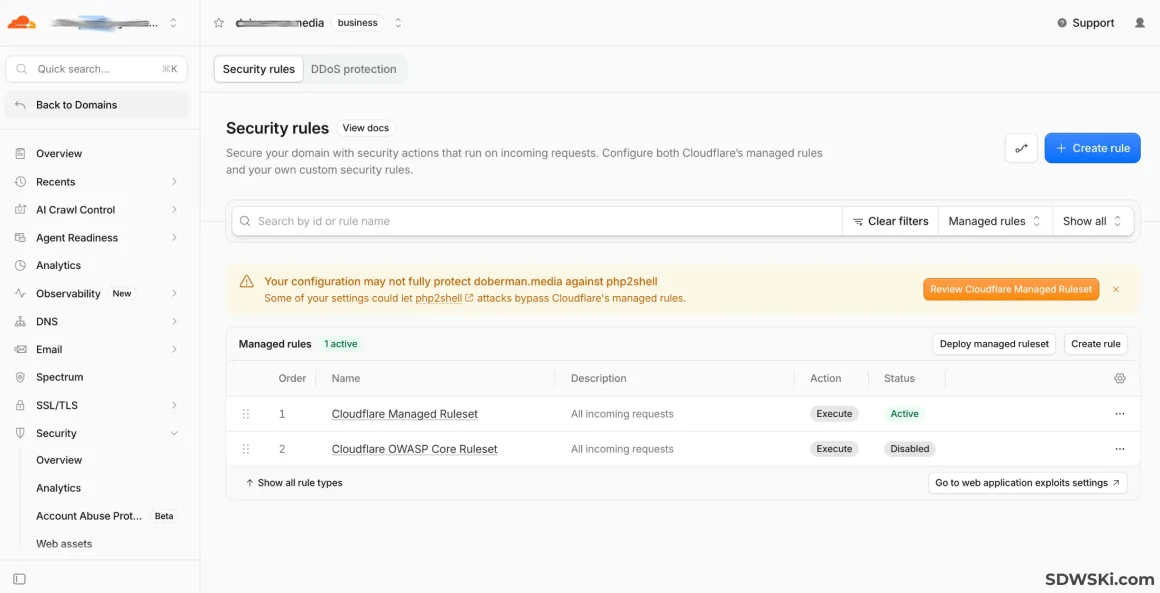
Security services such as Cloudflare also require attention. Simply having them does not guarantee security: incorrectly configured exceptions, overly broad rules allowing requests through, or configuration errors can weaken protection. On the other hand, overly aggressive rules can block legitimate visitors, including the administrator.
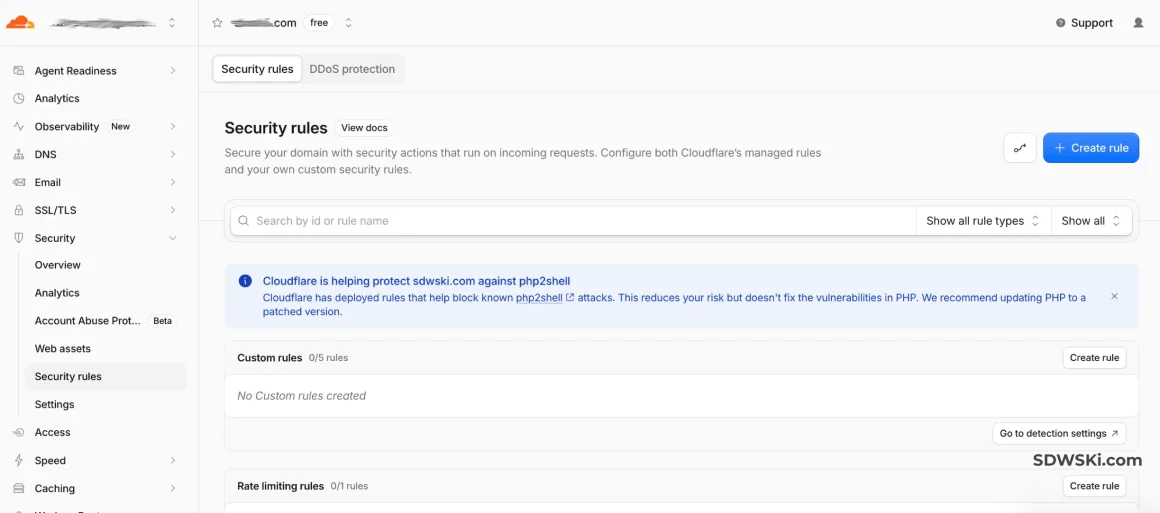
▲ For the poor, Cloudflare has automatically deployed a basic network-level rule on its free plan to block a known attack signature (Protection is enabled by default. Cloudflare automatically filters out such requests before they even reach the site)
▼ For wealthier users, I noticed another level of Cloudflare protection. On the paid Business plan used by one of my clients ($350 per month), you get full access to Cloudflare Managed Ruleset and OWASP Core Ruleset with extensive customization options. A notification warns that, under the current WAF (Web Application Firewall) settings, some rules may be disabled, skipped, or overridden by custom rules/exceptions, potentially creating a “hole” that allows the baseline protection to be bypassed.
Therefore, security is not simply a matter of installing another plugin or enabling a few switches in the control panel. It is a system that must be configured, tested, and kept operational.
And there is an important point here: prevention should be ongoing, not a one-time effort. A website may be configured correctly today, but a new vulnerability could be discovered in one of its components tomorrow. Good security does not mean that threats have disappeared. It means that the website owner can learn about them and respond promptly.
It is important not only to identify a threat, but also to respond appropriately
Suppose a specialist learns about a critical vulnerability in a popular software product. What should they do?
There is no need to immediately change every website setting or install the first update that comes along. First, it is necessary to determine which versions are affected, what fixes are available, whether the issue applies to the configuration in use, and what actions the developers and providers recommend.
The next step is to assess the risks, review the current settings, take the necessary measures, and make sure that the website continues to function properly after the changes.
Sometimes it is enough to confirm that the hosting provider has already applied the fixes. Sometimes the software must be updated, access to certain features restricted, or security rules adjusted. And sometimes the problem is entirely unrelated to the original vulnerability, even though it appears at around the same time.
This is precisely why technical knowledge alone is not enough; the ability to analyze the situation, ask the right questions, verify information, and make decisions without unnecessary panic is equally important.
In the age of AI, it is especially important not to confuse access to a tool with an understanding of how it works. Artificial intelligence can help a specialist analyze information, find errors, and speed up routine tasks. But it does not remove responsibility for the decisions made. An automatically applied change can disrupt a website, while a misunderstood recommendation can create new problems.
AI should help specialists work faster and more efficiently, not replace critical thinking.
Technical support should be proactive
To me, quality website maintenance means more than simply responding when a client says, “Nothing is working.” It also means doing work that the client may never notice because the problem was identified and resolved in advance.
Monitor critical updates. Review security settings. Keep track of the website’s health. Assess risks after infrastructure changes. Verify backups. Notify the business owner promptly if any additional action is required.
Of course, it is impossible to guarantee that a website will never be hacked or affected by a vulnerability. But it is possible to reduce the likelihood of many incidents, limit potential damage, and prepare for recovery in advance.
And that is the fundamental difference between basic maintenance and comprehensive website support.
What This Means for Business Owners
If your website generates leads, sales, customer inquiries, or provides important information about your company, it is worth considering who exactly is responsible for its technical health.
Not only who will fix an error if one occurs, but also who keeps up with changes in technology, understands the risks, monitors security settings, and can respond quickly to an unusual situation.
Not every business needs an in-house cybersecurity specialist. In many cases, it makes more sense to engage an external specialist who handles website development, technical support, and security as an integrated service.
However, it is important to understand that these tasks involve more than updating plugins once a month. They require a systematic approach, ongoing attention, and an understanding of how the website, server, security services, and external dependencies interact.
It is especially dangerous to assume that no one is interested in a small website. Large-scale automated attacks may target an entire class of vulnerable systems rather than a specific company. In such cases, the size of a business guarantees neither anonymity nor security.
My approach to website development and maintenance
I I specialize in website development, technical support, and security, and I believe that a good professional should see a project as more than just a collection of pages and features [подробнее].
It is important not only to make a website user-friendly, fast, and appealing. You also need to consider how it will operate after launch, how easy it will be to maintain, how well administrative access and data are protected, what will happen in the event of a failure, and how quickly the website can be restored.
I believe that a modern website professional should never stop learning, keep up with the latest developments, understand new technologies, and be able to adapt quickly to changing circumstances. This includes understanding how artificial intelligence affects security, which tasks it can accelerate, and what new risks it creates.
I do not believe in alarming website owners over every new vulnerability. But security news should not be ignored on the assumption that “it does not affect us,” either.
A reliable website is not one that never has problems. It is one that is systematically monitored, whose risks are understood, and whose owner is not left alone to deal with a technical issue.
In a world where automation makes it possible to scale not only useful tools but also attacks, waiting for a problem to arise is becoming increasingly unwise. It is far more important to have a professional who knows how to be proactive: identify threats, ask the right questions, take well-founded measures, and prepare the website for potential incidents in advance.
This is precisely the approach I believe is right: not merely building websites and responding to failures, but helping businesses prevent problems, make timely decisions, and retain control over their digital infrastructure.



Comments0
Leave a comment
Enter your email—we'll send you a one-time code. No password or registration required.
Your email is only used for the login code and notifications about replies (you can unsubscribe using the link in the email). It is not published or shared with third parties. After you log in, a cookie is stored for 30 days. You can download or delete your data in your account.
Enter the code
Code sent to . If the email doesn't arrive within a few minutes, check your Spam and Promotions folders.
Your name and comment will be displayed publicly. Your email address will not be published.
I want a comment system like this for my website