About
the project
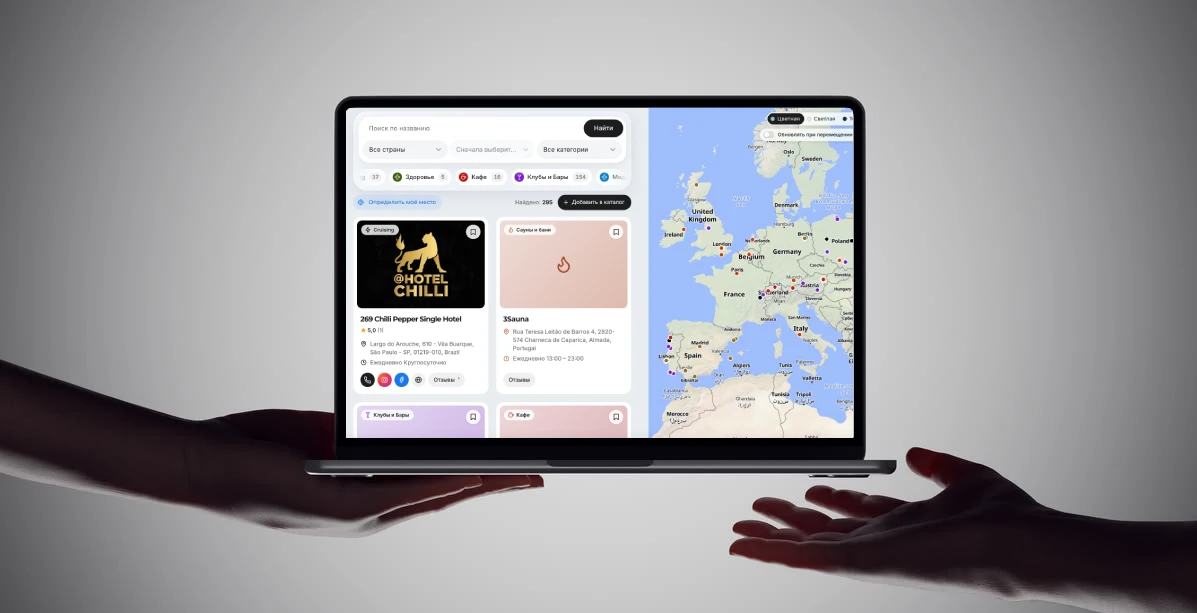
Directory of places and organizations for Doberman Media magazine
Timeline 6 weeks
Client NGO Doberman Media
Year 2026
Budget up to €2,500
Budget
Pro
up to €2,500
A smart solution for growing your business
The directory at doberman.media/catalog is a map and list of 295 LGBTQ+ places in 25 countries: clubs, saunas, hotels, cafés, and medical and legal services. I built it entirely as a WordPress plugin sdwski-directory (version 1.28.0, around 14,000 lines of PHP, JS, and CSS), without page builders or external API keys. Below is an overview of how the directory works and what can be said about it on the project page.
About the project. Doberman.media magazine needed a directory where readers could quickly and safely find a club, sauna, doctor, or lawyer in any city. I designed and built the entire system: the data, map, submission moderation, dashboard for venue owners, and ad placements.

Visitors select a country, city, and category and see all the places on the map, not just the first page of the list. The map quickly renders thousands of points and turns them into category icons when zoomed in. Each place page includes photos, opening hours with an “open now” status, directions in five mapping services, password-free ratings and reviews, and a “Report an error” form. Venue owners manage their own pages through a separate dashboard, while I can see every change.
- Filters. Select a country, then a city and category; category tabs include counters (currently: clubs and bars — 154, hotels — 58, saunas and bathhouses — 52, Cruising — 37, community organizations — 25). The total “Found: 295” appears at the top.
- Search by name, including translated names in the site’s other language.
- Cards. Photo, category, name, rating and number of reviews, address, opening hours, phone, Instagram, Facebook, website, and “Reviews” buttons.
- “List / Map” toggle on mobile and a floating filter panel over the map.
- “Update when moving the map”. The list updates to match the visible map area.
- “Show my location”. Visitor geolocation and list sorting by nearest places.
- Favorites. Saved places are stored in the browser, with no registration required.
- Full-screen mode without the site header and footer, plus kiosk mode for on-screen display.
- “Add to Directory” button and the “Is Your Place Missing from the Directory?” section at the end of the list.
Advertising. Advertising is built into the directory: a banner between cards after every N places, a vertical banner next to the map, and ad blocks on place pages. Everything is clearly labeled, and banners can be changed from the admin panel without editing any code. Ads are also displayed on the directory map.
Technologies. PHP and WordPress, Leaflet and MapLibre GL, OpenFreeMap, vanilla JavaScript, REST API, schema.org, and responsive layouts without frameworks. No API keys or impression limits.
Map and Search
The map is the heart of the interface, and it does much more than a typical pin-mapping plugin. It is powered by Leaflet, with MapLibre GL rendering the vector tiles; no accounts or API keys are required, as the tiles come from OpenFreeMap.
- All places on the map, not just those on the current page. A separate non-paginated request returns the coordinates of all matching places (up to 5,000), so the map does not depend on which page of the list the user is viewing.
- Three levels of detail. When zoomed out, small colored dots are drawn on a single canvas for speed. At medium zoom, verified places become “pins”; up close, every place in the visible area gets a pin with its category icon (up to 300 at a time).
- Category color and icon. A suitable icon is selected by name from the built-in icon library (a flame for saunas, a wine glass for bars, a cross for medical services), and it can be changed manually.
- The initial view is Europe. If nothing is selected, the map opens centered on the EU; once a filter is applied, it adjusts to fit the places found. The map does not wrap horizontally or extend beyond the poles.
- Three styles (“Colorful,” “Light,” and “Dark”), with the selection saved in the browser; when the site uses a dark theme, the map automatically switches to the light style. If the visitor does not have WebGL or the vector tiles fail to load within 12 seconds, the map automatically switches to OpenStreetMap raster tiles.
- Location popup Clicking a marker links it to the list: the corresponding card on the left is highlighted and scrolled into view.
- “Show my location”. The visitor's location and accuracy radius are displayed over the map, while the list is sorted by distance and labeled “km / m from you.” Geolocation is enabled only at the visitor's request and only over https.
- The list follows the map. If “Update when moving the map” is selected, the list displays locations within the visible area, along with a “Show more” button and a message if there are no locations in that part of the map.
- Full viewport-width page even within a narrow theme column; the map “sticks” below the site header, and the script detects the header height automatically.
Location page
Each location has its own page with a dedicated template: the left column contains text, photos, and reviews, while the right column contains contact details, a map, and opening hours. The template works with both classic and block themes WordPress; the theme can override it with its own file.
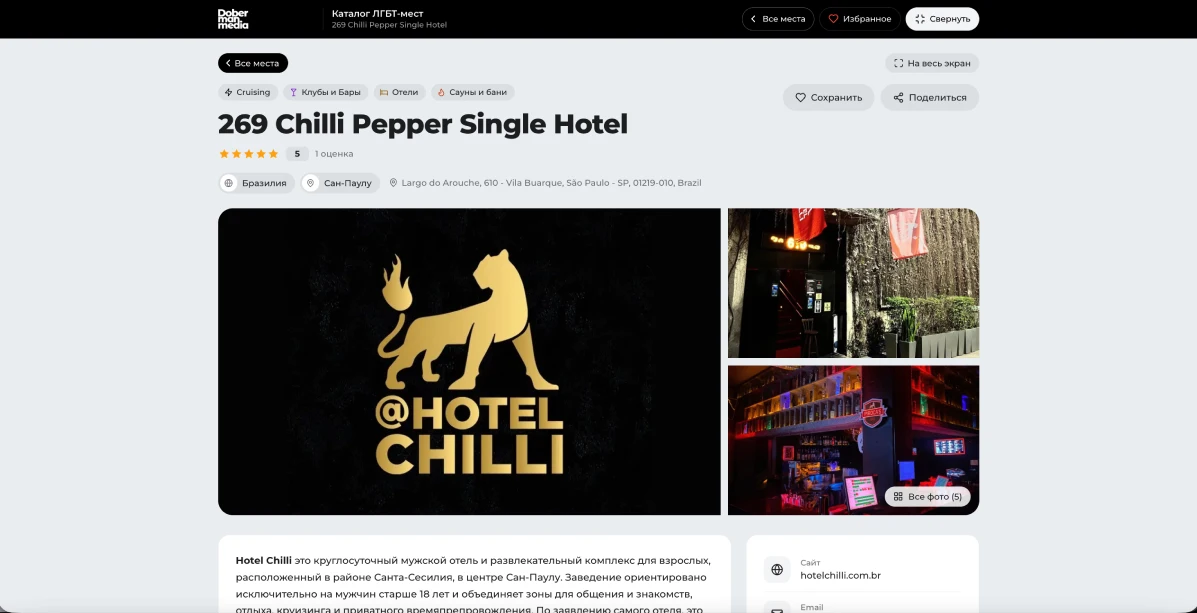
- Gallery with full-screen photo viewing and three YouTube videos. Each video is initially displayed as a poster image, and the player loads when clicked, so the page does not load third-party scripts.
- Amenities. A list of what is and is not available: unavailable amenities are marked with a red cross, for example, “no step-free access.”
- Opening hours by day of the week (open, closed, open 24 hours). The “Open now” status is calculated in the browser using the site’s time zone, so a cached page does not display yesterday’s status. Overnight schedules, where a club stays open until the morning, are supported.
- Directions. Visitors can choose “driving / public transit / walking,” and the links to Google Maps, Yandex Maps, Apple Maps, Waze, and OpenStreetMap adjust to the selected mode, using the visitor’s current location as the starting point.
- Location map — uses the same engine as the directory, with the same styling and fallback.
- “Save” and “Share.” Favorites are shared with the catalog homepage: saved places appear in a single panel in the bottom-left corner.
- “Unverified information” badge. If a place is not marked as “Verified,” visitors are clearly informed that its opening hours and contact details may be outdated, with a “This is my organization” button displayed nearby.

Reviews and ratings
Ratings and reviews are powered by the SDWSKi Comments plugin. Passwordless sign-in: a code is sent by email, and each verified address can submit one rating per place, which can be changed later. After a rating is submitted, the review form opens. The rating is also displayed on list cards, and the “Reviews” button takes users directly to the comments section. Ratings can be disabled for individual places.
Feedback
The “Feedback” card offers five options: report an error, “this is my organization,” “closed or relocated,” file a complaint, or leave a comment. Messages are saved in the admin panel and sent by email; if the sender provided an email address, you can reply directly from the email. Spam protection includes a hidden honeypot field, a single-use token, and a limit of 5 messages per hour from a single IP address (only a hash of the address is stored).
Submissions, moderation, and place owners
The catalog is populated from three sources: entries I add manually or import from CSV, visitor submissions through the “Add to catalog” form, and place owners themselves. Only published entries appear in the public list and on the map.
“Add a place” form
- The visitor fills out the form; a honeypot field and a limit of 3 submissions per hour from a single IP address protect against bots.
- The submission is saved with the “Pending Approval” status, and the administrator receives an email with a link.
- The address is converted into coordinates in the background. Existing countries and cities are assigned immediately, while new ones are only recorded and created upon publication, preventing submissions from cluttering the list of cities.
- I review the submission, make any necessary edits, mark it as “Verified,” and publish it.
Venue Owners
A restaurant owner, club manager, or nonprofit representative clicks “This is my organization.” This action alone does not grant any permissions: I verify the person and grant access with a single click.
- An account is created with the “Venue Owner” role and no access to the admin panel, and the person receives an email with a link to set their password.
- In their dashboard, the owner can see their venues and edit the name, description, contact details, hours, amenities, map location, and photos.
- The category, country and city, “Verified” status, and review settings remain under the administrator’s control.
- Edits are published immediately, and I receive an email showing “before → after” for each field, so no change goes unnoticed.
- The owner can post short updates about a place: no more than three; a fourth replaces the oldest one. Updates are displayed on the place page and can be shown in any section of the site using a shortcode.
Administrator Tools
The admin panel includes built-in documentation with a quick-start guide, all shortcodes, and ready-to-use examples; a “Group Cities by Country” section and a Latin-character address tool; as well as place page and advertising settings.
Ad Placements
Advertising is built into the plugin and configured in a single section of the admin panel: “Directory → Advertising.” The directory offers three types of ad placement, each labeled “Advertisement” so visitors do not confuse it with place listings.
| Placement | Where It Appears | How It Works |
|---|---|---|
| Banner in the List | between place cards, spanning the full width of the column | after every N cards (N from 2 to 30, default 4); banners rotate in sequence, with no ads after the last card |
| Vertical banner next to the card | a tall column along the right edge of the card, on screens 1024 px and wider | an image with a link or a ready-made HTML file; the width is set manually, with a default of 300 px for HTML files |
| Block on the venue page | in the right-hand column and below the reviews | HTML files sidebar.html and comments.html from the folder wp-content/lgbtd-ads/; the same block can be embedded anywhere on the website |
Each banner in the list is either an image with a link or ad network code. A “Place Your Banner Here” button always appears below the banner, linking to the publication's advertising purchase page, so the directory itself directs advertisers to the media kit.
Details worth mentioning separately
- Ads are integrated into the list. When a visitor filters places, moves the map, or sorts by distance, the banners are repositioned after every N visible cards instead of remaining where the server placed them.
- Ad blockers. The block next to the map uses neutral CSS class names without the words “ad” or “banner,” so it is not hidden by filter lists.
- Transparent markup. Banner links open in a new tab with
rel="sponsored nofollow noopener", and images are lazy-loaded. - Cache. After changing the ads, the plugin sdwski-directory automatically clears the cache of popular plugins (WP Rocket, W3 Total Cache, LiteSpeed, SG Optimizer, etc.); otherwise, visitors would see the old banner.
- Administrator diagnostics. The settings page shows exactly what was saved and why the banner may not appear; an administrative comment is left in the page source code for administrators.
- Security. Only users with the appropriate permission can save custom code in banners
unfiltered_html; scripts are stripped out for everyone else. - HTML files via FTP. Instead of creating an ad block in the admin panel, you can upload a ready-made file containing the advertiser's animation and layout; the file name is validated (Latin letters, digits,
-and_), preventing access outside the folder.
Technical solutions
The entire directory is powered by a single plugin with no dependencies on page builders or heavyweight frameworks: PHP for the server side, vanilla JavaScript for the map and interface, and custom CSS. The only third-party components are Leaflet and MapLibre GL, both bundled with the plugin.
| Layer | Technology used |
|---|---|
| Server | WordPress, PHP: post types, taxonomies, custom fields, REST API, AJAX, custom ratings table |
| Map | Leaflet 1.9.4, MapLibre GL 4.7.1, OpenFreeMap tiles, with OpenStreetMap as a fallback |
| Geocoding | Nominatim (OpenStreetMap), WordPress background task |
| Client | without frameworks: directory.js (about 1,300 lines), single.js, favorites in localStorage |
| Reviews | SDWSKi Comments plugin, with ratings linked to its verified accounts |
| Translation | translation files ru_RU + integration with the website translation plugin (search by translated names, parameter lang in the API) |
Performance
- Thousands of points are rendered on a single canvas, while full-featured pins are used only for the visible area, with no more than 300 at a time.
- Catalog styles (46 KB) are loaded only on pages containing a catalog, venue, or archive shortcode; they are not loaded on other magazine pages.
- The script file version is generated from the plugin version and the file modification time, so the browser does not retain an outdated copy after an update.
- Time-sensitive data (“Open now”) is calculated in the browser, so page caching does not interfere with it.
- The map does not rely on paid APIs: no Google or Mapbox keys and no display limits.
Privacy and Security
- The visitor’s favorites and location are never sent to the server: favorites are stored in the browser, while the location is used only on the map and only when requested.
- Only an IP hash is stored for form rate limits; form submissions are protected by one-time tokens and a honeypot field.
- Venue owners do not receive access to the admin panel, and every change they make is also emailed to the administrator.
- Unverified venues display a clear warning on their pages; only evergreen information is allowed in the catalog, with no prices or event announcements.
- When the plugin is deleted, venues, categories, and cities remain until I explicitly enable complete removal in
wp-config.php. - The plugin can be extended using WordPress filters (
lgbtd_rest_place,lgbtd_utm_params,lgbtd_schema_type,lgbtd_map_max_markers,lgbtd_kiosk_paramand others), allowing its behavior to be changed without modifying the core.
Project link
doberman.media